SharedCompute
A downloadable tool for Windows
[STILL A WORK IN PROGRESS VIBE CODED TOOL FOR CONNECTING TO FRIEND'S HARDWARE]
SharedCompute lets you run AI models on your laptop using someone else's GPU — securely, consensually, with zero configuration.
Install the Host on a gaming PC (dad's RTX 4090, your desktop, a friend's rig). Install the Client on your laptop. Both connect via Tailscale (encrypted, NAT-traversing, no port forwarding). Every connection requires explicit approval on the host — or an optional auto-accept with a prominent warning prompt.
Built for Hermes, works with any OpenAI-compatible client (Ollama, LM Studio, Open WebUI, custom code).
What is this?
You have a laptop. Someone you trust has a gaming PC with a beefy GPU. You want to run local LLMs but your laptop's integrated graphics can't handle it.
SharedCompute bridges that gap.
Host runs on the GPU machine — starts a llama.cpp server, exposes it over Tailscale
Client runs on your laptop — discovers hosts, requests sessions, auto-configures Hermes
Tailscale handles the networking — WireGuard encryption, NAT traversal, identity via tags
Consent first — every session requires a click on the host. Auto-accept exists but fights you to enable it.
Features
✅ Explicit approval required — no silent compute harvesting ✅ Auto-accept timeout (opt-in) — 15 min default, only after warning dialog ✅ Tailscale networking — no port forwarding, works anywhere, encrypted ✅ Hermes auto-config — one click, your agent points at the remote GPU ✅ Full settings menu — every timeout, limit, and behavior is tunable ✅ Resource limits — GPU memory reserve, CPU cores, thermal throttle ✅ Idle disconnect — frees GPU when you walk away ✅ System tray apps — lightweight, always accessible ✅ Open source — no telemetry, your machines, your rules
Quick Start
Prerequisites
Tailscale on both machines → Download | Tailscale
llama.cpp on host → pip install llama-cpp-python[cu124] or build from source
GGUF model on host (e.g., Qwen3-8B-Q4_K_M.gguf)
Host Setup (GPU Machine)
Install Tailscale, sign in
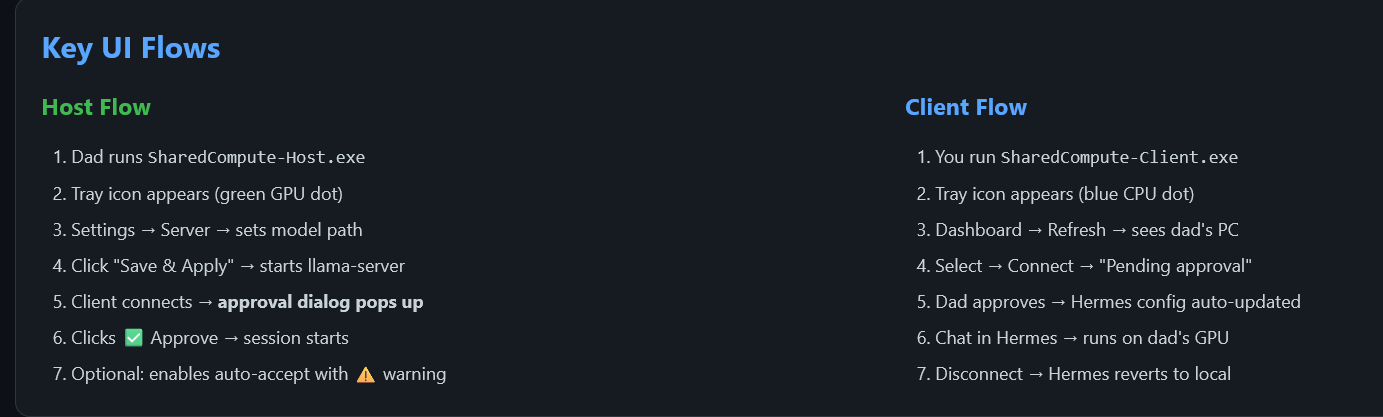
Run SharedCompute-Host.exe
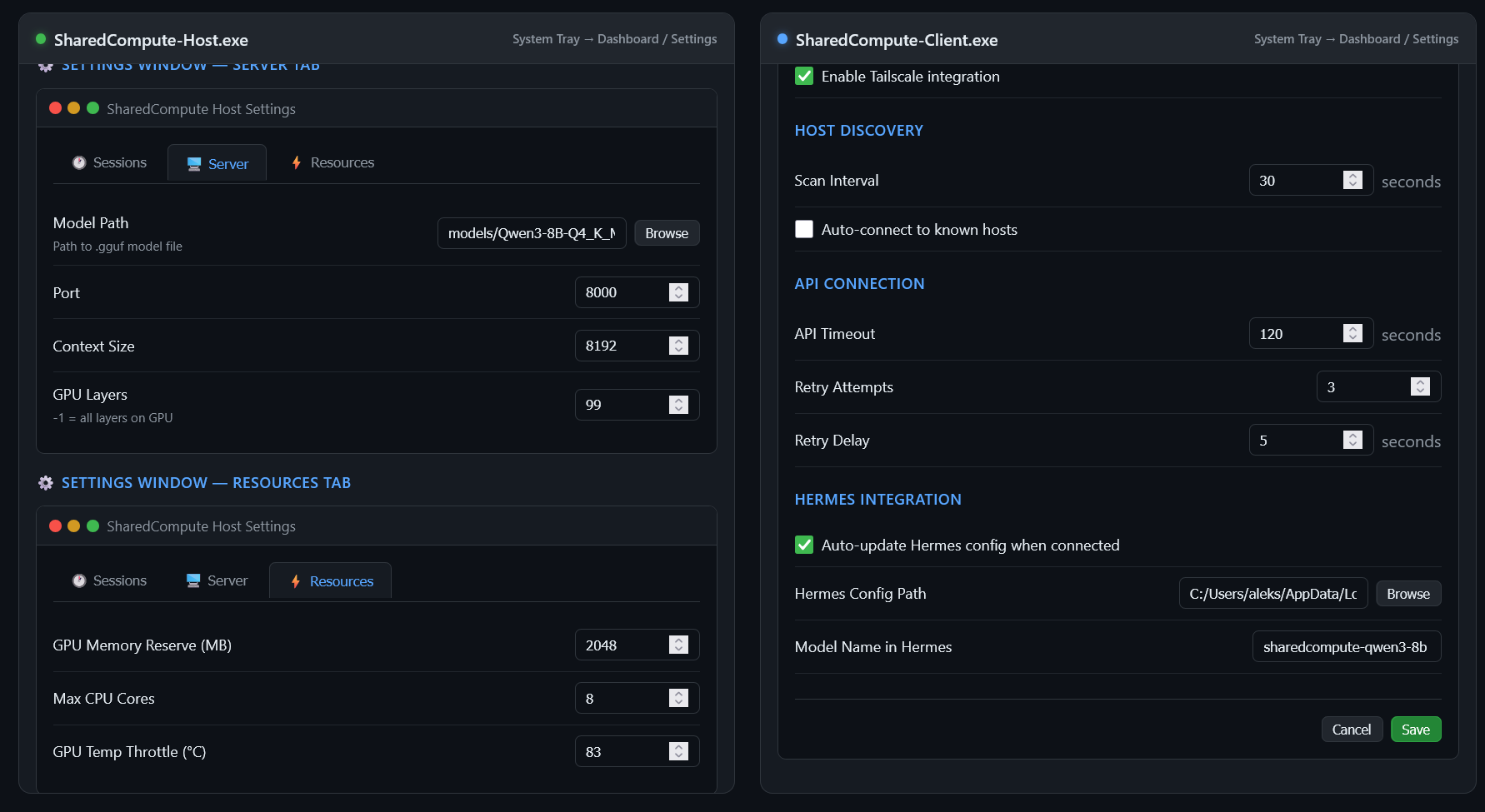
Tray icon → Settings → Server tab → set Model Path to your .gguf
Click Save & Apply (restarts server)
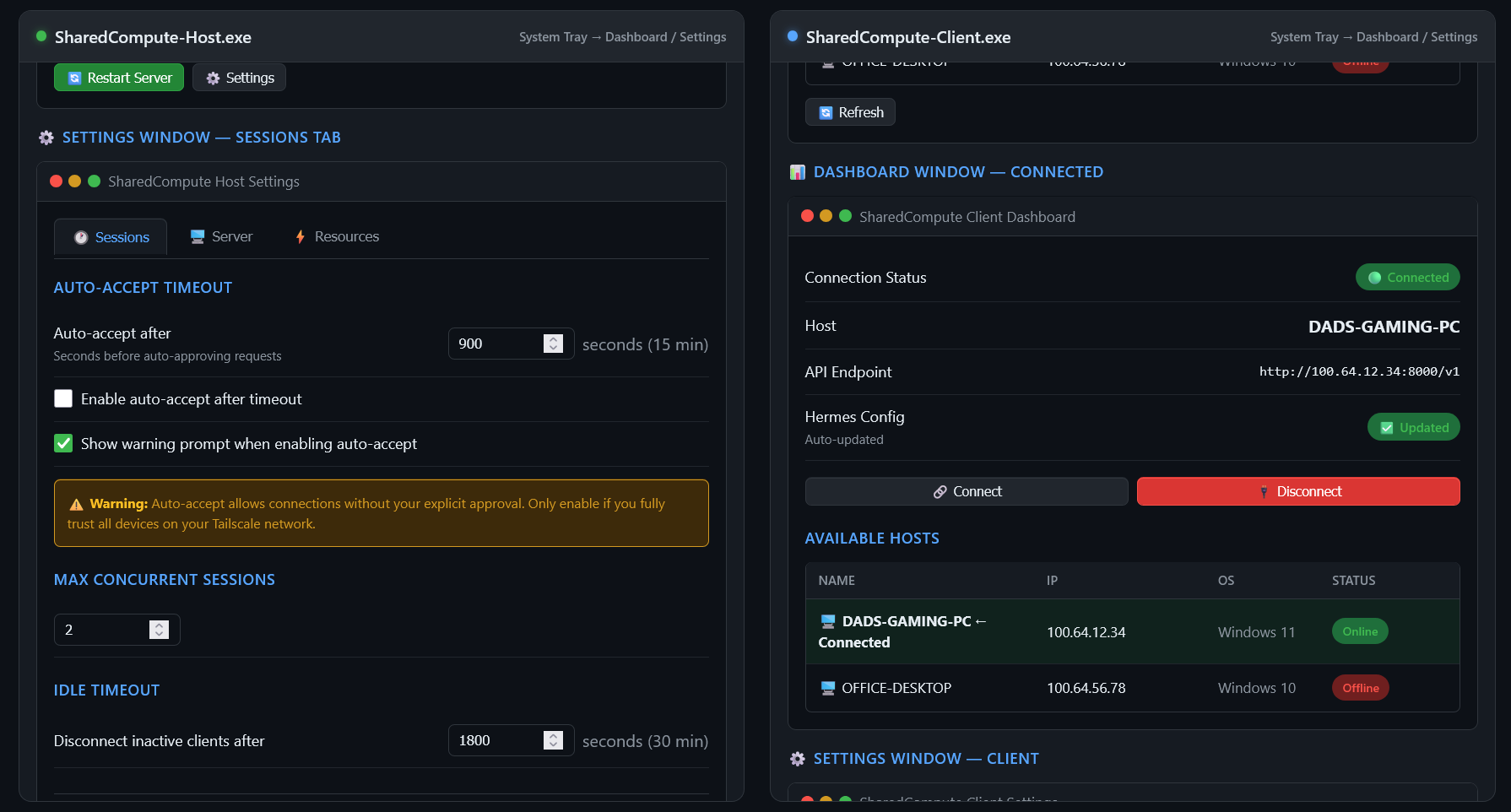
In Sessions tab, configure auto-accept if desired (shows warning)
Client Setup (Your Laptop)
Install Tailscale, sign in to same tailnet
Run SharedCompute-Client.exe
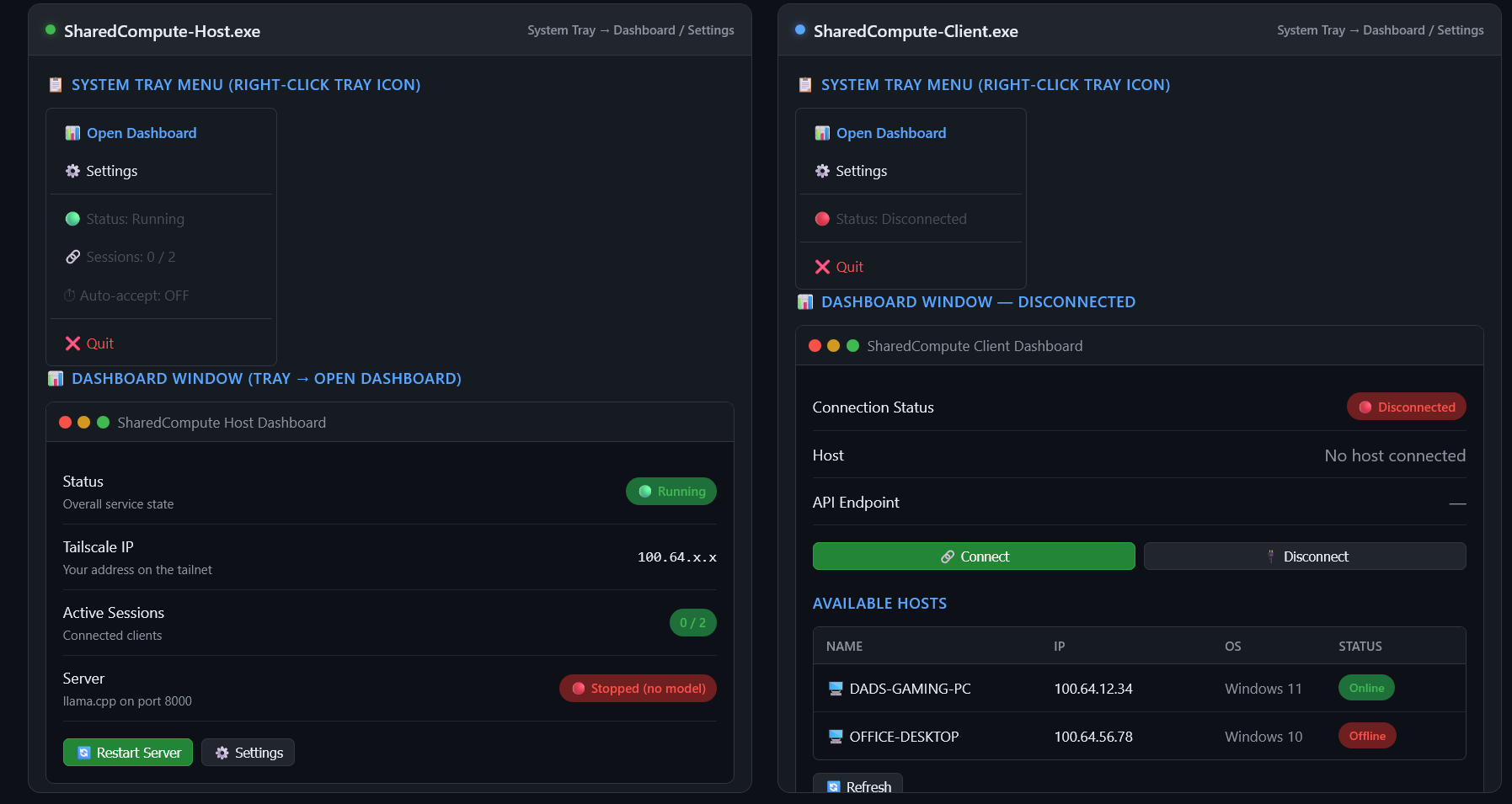
Tray icon → Open Dashboard
Click Refresh — host appears
Select → Connect
Host approves → Hermes auto-configures to use remote GPU
Security Model
Tailscale provides WireGuard encryption + identity
Tags (tag:sharedcompute-host, tag:sharedcompute-client) restrict discovery
No auto-accept by default — every session is a conscious choice
Auto-accept requires explicit enable + warning acknowledgment
Idle timeout prevents forgotten sessions
Max sessions limits concurrent load
Downloads
File
Size
Description
SharedCompute-Host.exe ~36 MB Run on the GPU machine
SharedCompute-Client.exe ~36 MB Run on your laptop
README.md — Full documentation
Windows SmartScreen: These are unsigned. Click "More info → Run anyway". This is normal for independent developer tools.
Compatibility
Client
Works?
Hermes Agent ✅ Auto-config
Ollama ✅ Point at http://host-ip:8000/v1
LM Studio ✅ OpenAI-compatible server
Open WebUI ✅ OpenAI-compatible server
Custom code ✅ Standard OpenAI API
License
MIT — do whatever, just don't be evil.
Credits
Tailscale — the networking magic
llama.cpp — the inference engine
PyInstaller — the packaging
Made for sharing compute with people you trust. If it's useful, tell a friend. That's the marketing budget.
Download
Click download now to get access to the following files:
Leave a comment
Log in with itch.io to leave a comment.